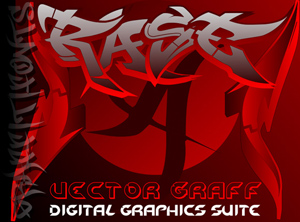
VectorGraff™ is a simple vector drawing application with which you can create
everything from technical drawings to logos, to fliers &
more, use all installed fonts on any MAC, PC, or linux computer,
add text to images and more. Even transparency and custom gradients
are available.
This tiny
application (well under 1mb) works at screen resolution (72
dpi) and can export your finished artwork in JPG, PNG &
GIF formats. VectorGraff™ runs on virtually any Windows,
Mac or Linux operating system and can even run right from any
CDROM or disk making it a basic portable work environment you
can take with you on a jump drive or any other storage device.
This
free download of VectorGraff will work for all Mac, PC or Linux
users. We have included several sample files to help you get
to know the application. If you have our Graffiti Fonts™
installed these sample files will be even more useful.
VectorGraff™
uses layers which can be moved in front or
in back of eachother or you can build your layout all on one
layer and use the "Send to Front" & "send
to Back" commands.
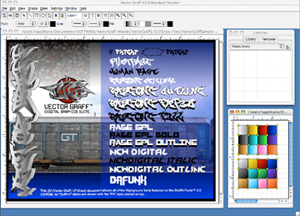
In the screenshot
on the left you can see two seperate VectorGraff™ documents
open at the same time with one being shrunk down out of the
way and used to create a bunch of gradient swatches.
You will also see the "Library" window
on the upper right. The "Library can be used to store templates
and files for repeated use.
In
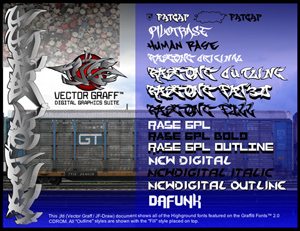
this next image showing just the layout you will see basic examples
of several of VectorGraff's abilities. I imported three images: a .JPG file, a .GIF file & a .PNG file (caps,
train, & VG logo).
I then typed
in several of our Graffiti Fonts™ and
layered the fill style fonts over thier outline styles to create
a simple style list of our 2.0 fonts. I grouped each fill style
with its outline style & left all the fonts together on
the same layer.
(VectorGraff™
can apply outlines & strokes as well as fills to any font
if the font does not come with an outline style.) I
used the same process to create the 3D vertical graffiti on
the left of this image and in the next sample below to create
a 3D effect using the outline styles.
Custom
gradients were created to shade the letterforms and
give them depth. To create a custom gradient all you have to
do is choose the colors you want and the order you want them
in.
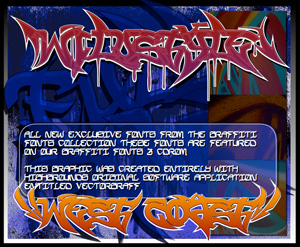
This
sample uses the WildStyle™ and Califas™ fonts from
our 3.0 collection however instead of using the outline style
that come with our fonts we applied these outlines & shadows
using the built in abilities of VectorGraff™.
Several
outline & fill properties were added with just a few clicks
using only 2 layers. You can see that some images were imported
to make a quick background & transparency was used in several
ways.
These
quick examples show how powerfull this tiny JAVA application
really is. From VectorGraff™ you can export an image file
to place in any application, on the web or for print.
This
free download of VectorGraff will work for all Mac, PC or Linux
users. We have included several sample files to help you get
to know the application. If you have our Graffiti Fonts™
installed these sample files will be even more useful.
In
these samples you will also see transparency used in a few different ways. Some images, fonts or shapes are
partially transparent such as the blue background in the first
sample or the verticle "GraffitiFonts" tag in the red example shown on the left.
Some other
objects are using transparency in another way. Custom gradients
were made which included transparent colors so rather than fading
from black to white, they fade from black to nothing (transparency).
This is a very usefull trick.
In this
example you can see that each of the letters in the main "RASE"
piece across the top is grouped with its outline and the grouped
letters have been moved in front of or behind eachother to create
a more advanced 3D effect.
This design
was created in only a few minutes, with just 2 gradients and
a few solid colors.